Enterprise LMS from K2B LearningThe LMS that comes with a learning team.
Run onboarding, compliance and role-based training across locations. Every LearningPin plan includes time with K2B Learning specialists to plan and produce courses, support your admins and review progress each month.
Coming to LearningPin: AI-assisted content creation, question writing and role-play practice. See how it will work
- Welcome to the companyDone
- Policies and POSHDone, quiz 9/10
- Site safety walk-throughClassroom, Pune, Thu 10:00
- Product basicsDownloaded for offline
- GurgaonAll started
- Pune2 not started
- ChennaiAll started
Pune site admin follows up with 2 joiners
Included every month
- Content strategy
- 1, 2 or 4 hours
- Plan what to build with eLearning and video specialists
- Course production
- 5, 10 or 10+ person-hours
- Turn your material into modules and short lessons
- Technical support
- 4, 8 or 8+ person-hours
- Help for your admins and your content
- Progress review
- Every month
- Go through your results with us and agree next steps
Hours shown for Starter, Growth and Enterprise. Compare plans
Start with 80+ ready-made courses
Email etiquetteEffective presentationNegotiation skillsConflict managementManagerial excellencePerformance counsellingBuilding resiliencePOSH (Prevention of Sexual Harassment Act, 2013)5SKaizen7 QC toolsFinance for non-financeMicrosoft Office
From K2B Learning’s library, ready to assign on day one. Your plan’s production hours build what’s specific to you.
A month with LearningPin.
Most LMS plans stop at software. Each LearningPin plan adds a fixed amount of specialist time, every month.
- PlanContent strategy
A session with K2B Learning’s eLearning, microlearning and video specialists to decide what to build next.
- BuildCourse production
Person-hours to turn your material into eLearning modules, microlearning and short knowledge nuggets.
- SupportTechnical support
Help for your admins with set-up questions, uploads and the platform.
- ReviewMonthly progress review
Your learning data, reviewed with you, and goals for the month ahead.
Assign, learn, track, follow up.
One example, start to finish: onboarding new joiners across three sites.
Assign
L&D builds the path once and assigns it to every site.
Online modules, a classroom session at each site and a short quiz sit in one onboarding path. Site admins see only their own joiners.
Onboarding: March joinersPath, built once- 1. Welcome to the companyOnline, 20 min
- 2. Policies and POSHOnline, with quiz
- 3. Site safety walk-throughClassroom, each site
- 4. Product basicsMobile, offline
Assigned to Gurgaon, Pune and Chennai
Learn
Each new joiner sees what to do next.
On the web or the app, in English or Arabic. Modules download for offline use; the classroom session shows its time and place.
Next upNew joiner, Pune site- Site safety walk-throughThu 10:00, Pune training room
- Product basicsDownloaded, 3 short lessons
Track
HR and site admins see progress by site and by person.
Completion and quiz scores for each joiner, rolled up by site. Nobody needs to compile a spreadsheet.
Pune site9 joiners- 7 joinersOn track
- 2 joinersNot started Policies and POSH
- A. Sharma3 of 4 done
- R. Iyer0 of 4 done
Follow up
The right person acts, and leadership gets the summary.
The Pune site admin follows up with two joiners. HR gets an Excel or PDF report on a schedule it sets.
This weekFollow-up- Pune site adminFollow up with 2 joiners
- HR headOnboarding report, every Monday
Not product screens. Names, sites and times are illustrative.
AI for learning design, assessment and practice.
Give LearningPin material you already trust. AI drafts the course, the questions and a conversation to practise. Your team stays in charge of what learners see.
L&D reviews and edits every draft before learners see it.
Learning module Draft
Selling the Premium service plan
- Objectives: explain what the plan covers; match it to customer needs; handle common objections
- Sequence: 1. What’s included, 2. Who it’s for, 3. Price conversations, 4. Objections
Knowledge check Draft
- Which of these does the Premium plan cover?
- A customer says the plan costs too much. What should you ask first?
Conversation to practise Scenario
A customer renewing their plan asks why Premium costs more than Basic.
Your goal: explain the difference and agree a next step.
- Coming to LearningPin
Create questions from your content
Generate draft quiz and assessment questions from the learning material your team provides. Review and edit them before use.
- Coming to LearningPin
Turn raw material into structured learning
Use documents, presentations, SOPs or subject-matter notes to create a structured draft with learning objectives, topics and a suggested sequence.
- Coming to LearningPin
Practise conversations with AI role-plays
Give employees a scenario to practise, such as handling a customer objection, responding to a service complaint or conducting a feedback conversation.
- Scoped separately with K2B Learning
Build custom AI tools for your organisation
Work with K2B Learning to scope an AI tool around a specific training or business workflow, as a separate engagement.
Progress your CHRO can read.
Completed and not-yet-completed learners for every course, on one screen.
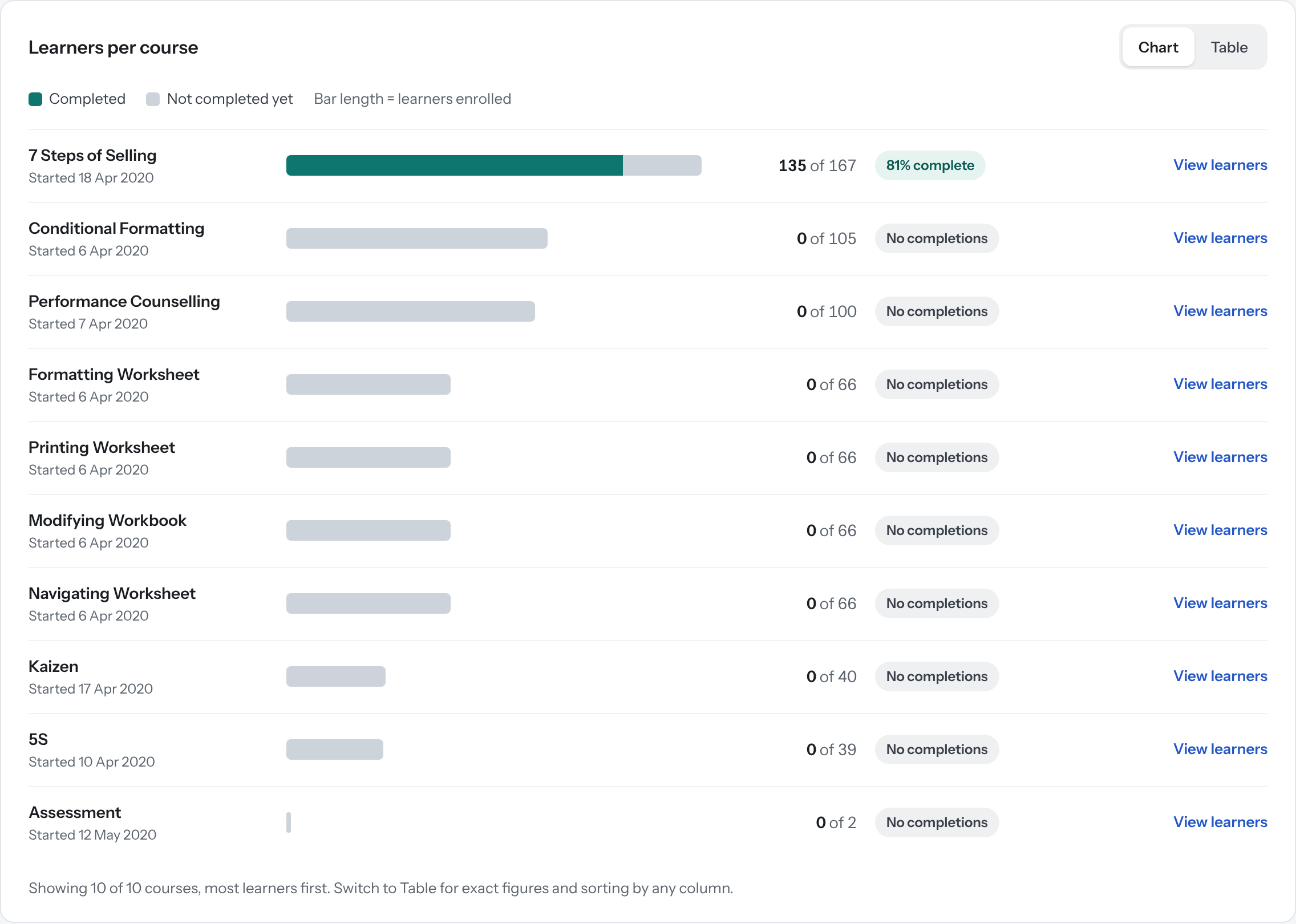
Teal is completed, grey is not yet. Each bar is a course; its length is the number of learners enrolled.Report preview: redesigned layout with 2020 sample data. The released product may differ.
What’s included beyond the software?
Does LearningPin support Arabic?
Can people learn offline?
Will our existing courses work?
Does LearningPin use AI?
How is LearningPin priced?
See your programme running on LearningPin.
One demo for L&D, HR and IT. Prefer to talk? Call +91 9910902616.